Define the real thing the business cares about: request, person, asset, shipment, case, location, order, product, entitlement or service point.
Low-code operations app platform
Build operations apps around your real work.
Bring records, boards, maps, reports, and handoffs into one operations app instead of piecing work together across spreadsheets and side tools.
1
Operational recorddata / state / history
2
Security & dataroles / fields / audit
3
Maps & routingzones / GEO
4
Boardsprocess state
One connected operations appYour operations app
Ready
5
Work Scheduleeffective working time
6
Dashboards and reportsmetrics / drill-in
7
Templatesbusiness patterns
8
Custom operationsC# extensions
9
Entitlement Operationsrights / ledger
1
Operational recorddata / state / history
2
Security & dataroles / fields / audit
3
Maps & routingzones / GEO
4
Boardsprocess state
5
Work Scheduleeffective working time
6
Dashboards and reportsmetrics / drill-in
7
Templatesbusiness patterns
8
Custom operationsC# extensions
9
Entitlement Operationsrights / ledger
Capability gravity
Core
Your operations app
Run your whole operation in one governed place: data, process, responsibility, location, history, and C# logic.
Governed business object
Browse sections ↓
Start in the cloud. Self-host when control matters. Your data stays portable.
I
Your operations app
8 capabilities / one runtime01Operational record
The record your team cares about stays at the center.
Keep the full context of a case, customer, asset or other business object in one operational record: data, process stage, owners, history, location, reports and integrations. Moltaro Boards, maps and reports use the same record instead of creating copies. In Moltaro, an Entity defines this kind of record.
Create list, detail, form, map, board and dashboard surfaces so different users can work with the same record in the right context.
Add access, responsibility slots, team assignments, inherited child access, status movement, notifications, C# logic, API hooks and audit so the process can run without losing control.
Record system
One governed record
The business object stays readable while work moves around it.
Fields, child rows, references, files, comments, tags and audit keep the record whole.
Lists, details, drawers, boards, maps and reports work from the same operational record.
Access, responsibility, history and C# logic stay connected as the process grows.
02Security & data
Keep responsibility, access, and data ownership clear.
Decide who can see and change each record, who owns the next step, and how every decision is traced. The same access model follows the work across Moltaro Boards, GEO, reports, and deployment choices.
Model owner, accountable, assignee and reviewer slots per entity, then assign users or teams to the concrete record where they are responsible.
Contained child records can inherit mapped responsibility from the parent, while ordinary references stay independently governed so access does not spread by accident.
Boards can use multiple named item and status responsibilities; GEO can route work to the right responsible team; reports and inbox signals keep that accountability visible.
Single sign-on and external identity providers can prove who the user is. Moltaro still owns local authorization: users, roles, responsibility, field rules, audit behavior and runtime data.
Backups and exports belong in every deployment model. Dedicated and self-hosted paths add deeper controls, including direct database access where the customer needs it.
03Maps & routing
Use location to route work to the right territory and team.
Moltaro GEO matches addresses and coordinates to zones, then reuses that result in maps, filters, heatmaps, reports, and responsible-team assignment.
GEO proof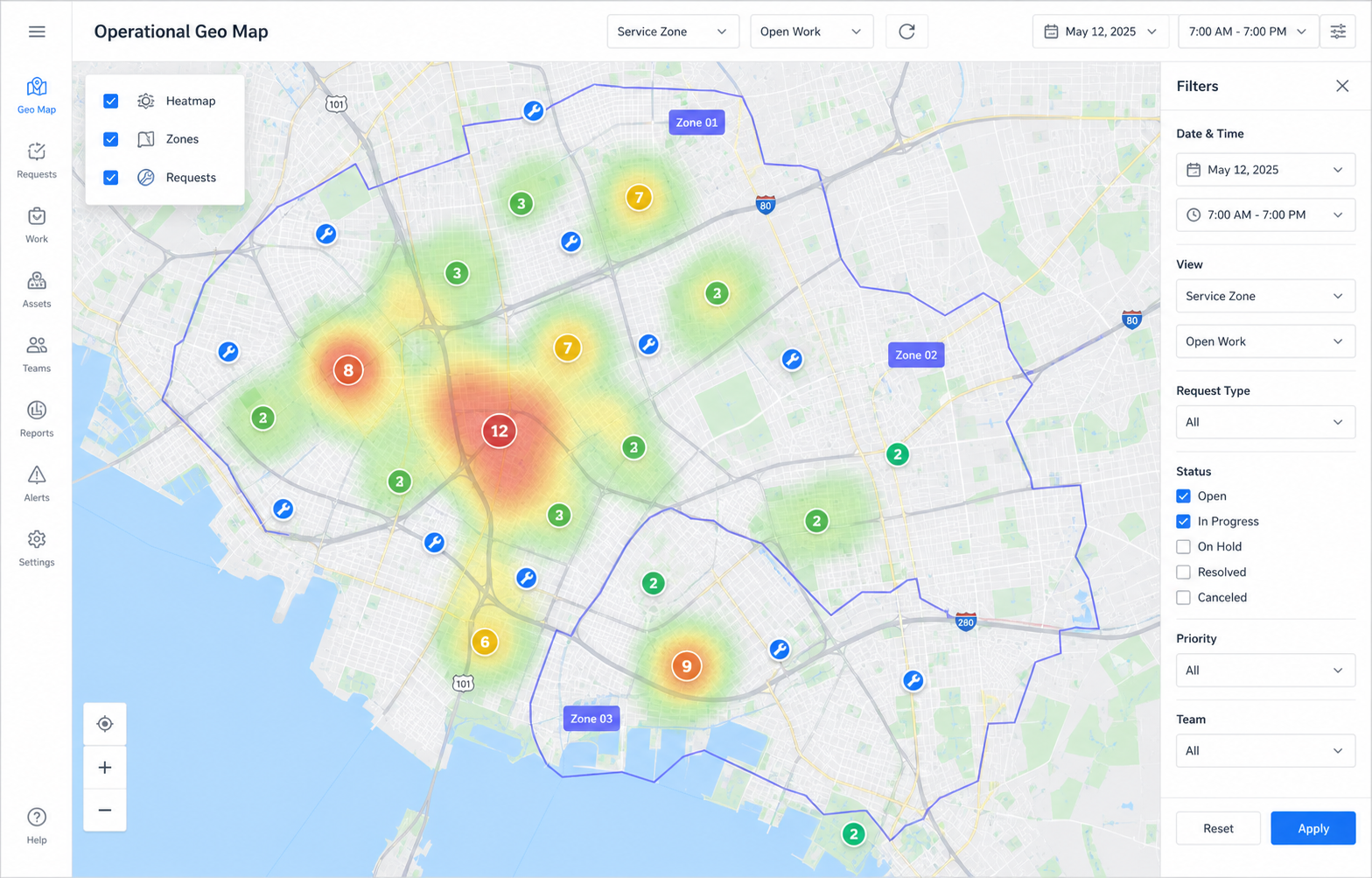
Create territory layers, draw polygons, paste GeoJSON, or import existing public boundary data into editable Moltaro zones.
Records and Moltaro Boards items can show which zone contains their selected location.
Maps, lists and reports can focus on a zone, compare coverage, or show demand concentration as a heatmap.
Zone policies can select the responsible team or board responsibility path when a record enters the mapped area.
04Boards
Move work through stages without splitting the record.
Boards add a controlled process over the same business object: stages, responsible people and teams, due dates, history, and location-aware routing while the record stays the single source of truth.
Boards
The same object can appear on several boards or come back for another pass without becoming a disconnected copy.
Assign each item to the person or team handling it, and give each stage the team responsible for moving work forward. People can act because they are responsible, without opening the whole board to everyone.
Run a continuous Kanban board or planning cycles with rollover, scoped to the same permissions, child blockers and responsibility model.
Use the work's location to route it to the team responsible for that area, while every handoff stays tied to the same record.
05Work Schedule
See the effective schedule, not another disconnected rota
Working Schedule combines published calendar patterns, Site and Worker assignments, and exceptions into one governed answer for each day and moment.


Move between person, place, and cross-team views without rebuilding the same schedule in separate tools.
Answer a precise moment or scan a longer period with layouts designed for desktop and mobile.
Assign published calendars to Sites, let Workers inherit them, or select a personal calendar when the pattern differs.
Record holidays, closures, leave, training, overtime, trips, and added working time without rewriting the ordinary pattern.
06Dashboards and reports
Dashboards scan the operation. Reports explain the number.
Use ready-made dashboards and reports for common work, then add a typed C# source in a Net Operation Project when the team needs a custom metric.
Data source
Governed metric
A typed source returns bounded, permission-aware data for dashboards and reports.
Fast operational scan for status, load, overdue work and trends.
Sectioned views for teams that need context behind the metric.
Links open records, board items or operational detail with access checked again.
Modules can ship ready dashboards, reports and data sources for the work they own, starting with operational metrics and Boards.
When the business needs a new metric, the technical team can add a typed source in a Net Operation Project without asking users to write SQL or browser scripts.
The same source can feed a dashboard widget for scanning and a report block for structured review.
Reports are checked against current data and access rules before publication. Older definitions can be retired without losing their history.
07Templates
Start from a business pattern. Keep the result as your own system.
Templates can prepare object structures, process surfaces, and full business starters. Moltaro shows the plan first, then applies ordinary editable configuration your team owns.
Preview plan
Business starter
A guided template proposes configuration before anything is applied.
Records, fields, relations, UI surfaces, matching, and demo data.
Boards, stages, actions, routing context, and responsibility.
Objects, process, reports, roles, reference data, and post-apply work.
Create useful record types with fields, relationships, surfaces, matching intent, demo data, and governed defaults instead of starting from an empty model.
Add boards, stages, actions, routing context, and responsibility around the same operational record when the template describes a repeatable workflow.
Compose objects, processes, reports, roles, reference data, and follow-up tasks into a business starter without turning it into a locked vertical app.
Review what will be created, reused, skipped, or blocked. After apply, the result is normal Moltaro configuration, not vendor-owned template state.
08Custom operations
Make operations enforce rules, run logic and react to events.
Start with straightforward rules. When a process needs more, add C# in a Net Operation Project and trigger follow-up work only after the original change succeeds.
Runtime layers
Operational behavior
A record can combine rules, C# logic and event automation while access rules and history remain visible.
Conditions, statements, validation and calculations cover repeatable operational facts.
A workspace-owned .NET project carries typed C# when configuration stops being enough.
Committed changes can become automation facts for downstream work.
Field behavior, statements, validation rules and calculated fields cover the ordinary decisions that should stay configurable.
Workspace-specific C# lives in a full .NET project for validation, mutation, actions, schedules and endpoints.
Automation rules can sit on committed runtime events so records, Boards and Entitlements can react through governed backend automation instead of hidden ad-hoc scripts.
Runs, retries, actors, source events and record changes stay visible in the platform runtime instead of disappearing into untracked side scripts.
09Entitlement Operations
Manage service access, allowances, and coverage as traceable records.
Entitlement Operations records who can use a service or resource, under what terms, with which limits, and for how long. Every grant, renewal, hold, usage, and reversal remains explainable. It does not replace billing.
Entitlement Operations
Software license, membership, information-service access and warranty models share typed runtime rules and conditions.
Grant, renew, suspend, resume, revoke and expire rights, then keep periods and effective state understandable.
Every operation appends to a ledger and publishes events, so effective access and history stay provable.
II
Why Moltaro
Operations apps that stay useful as the work gets more connected.
Basic app builders can put forms and tables on top of data sources. Moltaro gives each operational record its own data, process state, responsibility, access rules, history, boards, maps, reports, and extension points.
Define the records, forms, fields, relations and views your operation actually needs, then keep adapting them as the process changes.
Move work through boards, see locations, zones, heatmaps and coverage on maps, and report on the same records instead of rebuilding the picture from side trackers.
Start in the cloud for a faster pilot, or self-host when policy, contracts, local debugging, or infrastructure ownership matter more.
Operational data lives in a standard relational model you can inspect, export, integrate, and take with you.
Use C# logic, APIs, webhooks, triggers, and scheduled jobs when the process needs implementation depth beyond configuration.
Roles, field access, responsibility, audit history, and deployment control keep the operation explainable as more people and records depend on it.
III
How to start
Start with one real object, then build the system around it.
Keep the full context of a case, customer, asset or other business object in one operational record: data, process stage, owners, history, location, reports and integrations. Moltaro Boards, maps and reports use the same record instead of creating copies. In Moltaro, an Entity defines this kind of record.
Define the real thing the business cares about: request, person, asset, shipment, case, location, order, product, entitlement or service point.
Create list, detail, form, map, board and dashboard surfaces so different users can work with the same record in the right context.
Add access, responsibility slots, team assignments, inherited child access, status movement, notifications, C# logic, API hooks and audit so the process can run without losing control.
IV
Pricing and deployment
Self-managed Free, Self-managed Unlimited, or Managed CloudChoose who operates Moltaro and how much capacity you need.
Run self-managed free up to 5 GB, remove the storage limit once for €1,490, or choose managed cloud when you want Moltaro to operate the environment.
Free includes 5 GB of total workspace storage. Unlimited removes the Moltaro storage limit permanently. Both include unlimited users and every update.
Managed Shared and Managed Dedicated set the monthly subscription, hosting model, included capacity, and available add-ons.
Within the selected package, increase managed app count, runtime storage, backup storage, and backup allowances independently. Managed Dedicated can also add VM capacity; high-volume map and address usage is handled separately.
V
Notes
DataIn your PostgreSQL, portable and no lock-in
AuditAppend-only, explainable trail
AccessServer-side role & field rules
DeployCloud / self-host / on-prem